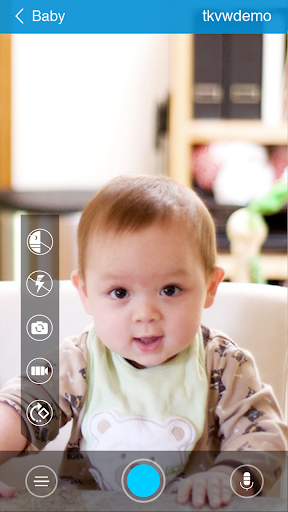
If you are looking for a practical solution that will help you Monitor and control your devices remotely Or, to monitor family members in an organized way, TrackView It is a well-known option because it turns a phone, tablet, or even a computer into IP camera connected with GPS tracking It offers instant alerts and recordings that can be reviewed later. Best of all, it requires no additional equipment or extensions; simply install the app and connect your devices in minutes.
Very important: Use TrackView only on your devices or on devices for which you have explicit permission. Monitoring without consent may cause legal and security problems.
What is TrackView? And how does it work?
TrackView is an application primarily designed for the idea of Family safety Remote device monitoring. The concept is simple:
- A device that is a “camera/transmitter” that you place in the location you want to monitor.
- Another device acts as a “viewer/controller” from which you monitor the image, sound, and alerts, and control the features.
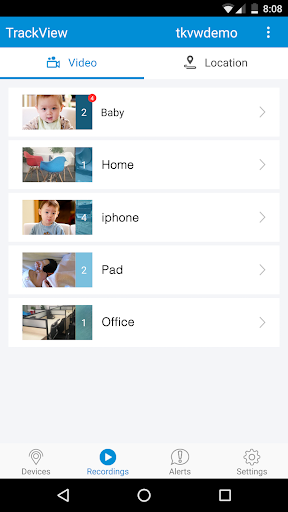
The strong feature here is that it works across more than one platform, and an Android phone can be linked to an iPhone or a computer as needed, to create a “surveillance system” without purchasing professional cameras.
Why will people prefer TrackView in 2026?
Because many users want 3 things in one app:
- Monitoring the location with audio and video
- Track the location of the lost device or the family.
- Smart alerts When movement or sound occurs
TrackView combines these points with a quick setup and using older devices you have at home.
Key features of TrackView software
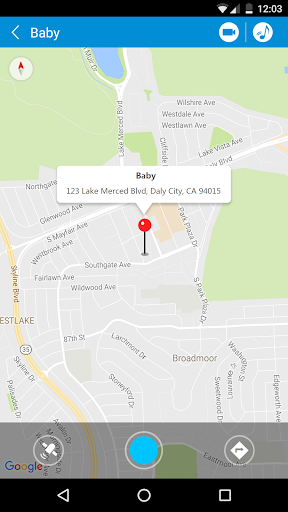
Family Locator and GPS Tracking
You can know the device's location in real time, with the "Track History" feature to save movement locations over a specific period.
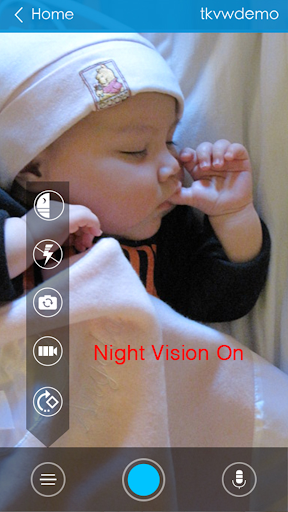
Turn your phone into an IP camera for home security
Turn an old phone into a security camera for the door, children's room, warehouse or shop.
Motion and sound detection + instant alert
When motion or sound is detected, you receive a notification directly on the other device, which is an excellent feature if you want to monitor a room or entrance.
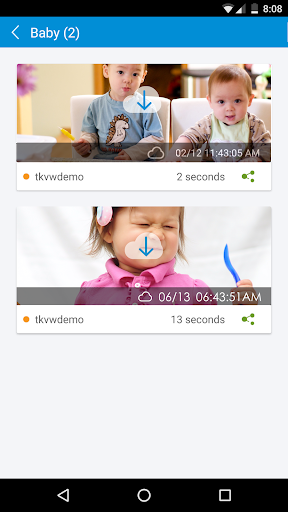
Remote video and audio recording
You can record footage when needed and refer back to it later, instead of relying solely on live viewing.
Two-way audio
You can speak through the monitored device and hear the sound from it, like a simple “intercom” inside the house.
Remote ringing for the lost device
A very useful feature if your phone is lost: it makes the device “ring” even if it is in silent mode (according to system settings).
Front and rear camera control
Switching cameras helps you choose a suitable angle for monitoring depending on the location.
Worked on multiple networks
It supports Wi-Fi and mobile data (2G/3G/4G…), with the ability to continue when changing networks depending on connection availability.
Practical uses of TrackView software
Home security camera without equipment
Place an old phone on the charger in a fixed location, and monitor it from your primary phone.
Monitoring children or the elderly (with family consent)
The dual alert and sound feature helps provide quick reassurance when needed.
Finding a lost phone
Combining GPS with remote ringing makes accessing the device easier.
Monitoring an office or small shop
Without installing cameras and incurring costs, TrackView can be a temporary and effective solution.
Step-by-step guide to setting up TrackView
To ensure that the devices are connected correctly the first time, follow this order:
1) Prepare at least two devices
- A monitoring device (camera)
- A device for viewing (your main phone)
2) Log in with the same account on all devices
Use the same account to unify the connection between devices.
Important advice: Give each device a clear name such as “Salon Camera” or “Ahmed’s Phone” so that you do not get the devices mixed up.
3) Granting the required permissions
- Camera + microphone permission (for audio and video monitoring)
- Location permission (for GPS and route recording)
- Permission to send notifications (for instant alerts)
- Disable the app's "battery restriction" (to prevent it from running in the background)
4) Selecting the usage mode
- Live monitoring
- Motion/Sound Alerts
- Recordings when needed
Security and privacy in TrackView
For safe use:
- Do not share your login details with anyone.
- Activate your account protection with a strong password.
- Do not use the app to monitor people without their knowledge.
- Monitor the devices linked to your account and make sure they are only devices known to you.
Common problems and quick solutions
Problem: Camera feed doesn't appear or cuts out quickly
the solution:
- Make sure the app is not battery-limited
- Mount the device on a strong Wi-Fi network.
- Close any VPN apps that might occasionally cause conflicts.
Problem: Notifications are not being received
the solution:
- Activate notifications
- Grant permission to "work in the background".“
- Make sure motion/sound detection is enabled in the settings.
Problem: The location is inaccurate.
the solution:
- Activate “High Location Accuracy” if available
- Make sure to always allow the app access to your location (not just while in use).
Frequently Asked Questions about TrackView (FAQ)
Is it possible to monitor a phone from anywhere?+
Yes, as long as there is internet on both devices, you can watch and control remotely.
Do I need a special camera?+
No, the app turns an old phone into a surveillance camera.
Does it work without internet?+
Live monitoring and alerts require an internet connection, and some local settings vary depending on the device.
Can more than one device be connected?+
Yes, you can link multiple devices to the same account and view them as needed.
Summary of free remote phone monitoring software
TrackView An excellent option for those who want a quick solution that combines Home security camera + GPS tracking + motion and sound alerts + remote control Through your phone, and at the lowest possible cost. With permissions and settings properly configured, you'll get a stable and secure experience suitable for both family and business use.
Also download: netflix mod apk.












No comments yet.