Controlling app internet connectivity has become essential, not only to conserve data but also to protect privacy and reduce tracking, hidden ads, and suspicious background connections that occur without your knowledge. This is where apps come in. Firewall No Root Which gives you an effective “firewall” on Android without the need to root, so you can block the internet for any application, monitor the network, and easily control network permissions.
In this article you will find a professional and detailed explanation about the idea of applying a firewall without root, the most important features, how to use it, the best settings, and the limitations that you should know before relying on it.
What is a no root firewall app?
No root firewall is a type of Android firewall application that works without root privileges. Its primary function is to manage internet connectivity for applications, allowing you to:
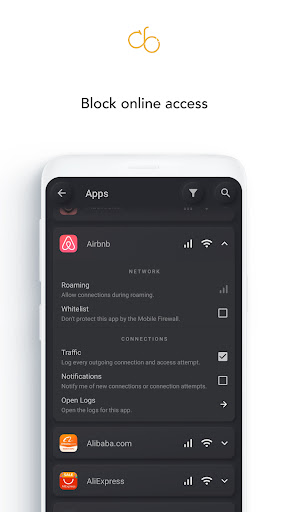
Block internet access for specific apps, allow access for other apps, control operation over Wi-Fi or mobile data, and review connection attempts made in the background.
Instead of letting your phone connect to any server at random, this type of app gives you a clear layer of control that helps you decide who is allowed to connect and who is blocked.
How does a firewall work without root access?
Most no-root firewall apps rely on Android's built-in VPN technology. The concept is simple:
The app creates a “VPN tunnel” within the device itself (without changing your country or hiding your IP), and then all internet connections pass through it. The app then filters the connections according to your rules.
This method gives you strong control without root, but it also explains why the “VPN connection” message appears when the firewall is turned on, because the system considers it a local VPN for filtering purposes.
Why do you need a No Root Firewall in 2026?
Many modern apps don't just perform their basic function; they also handle additional tasks like analytics, advertising, and tracking. Having a firewall without root access offers practical benefits such as:
Reduce tracking and minimize unnecessary connections, save data consumption, improve battery life, and give you a clearer view of apps running in the background.
Features of the no-root firewall app
Internet control for each application
You can block specific apps from using the internet entirely, or allow them only when needed. This feature is useful for games, lightweight apps, or any app that doesn't require a constant internet connection.
Disconnect Wi-Fi from mobile data
You can allow an app to use Wi-Fi only and block it from using mobile data to avoid draining your data plan, or vice versa, depending on your usage.
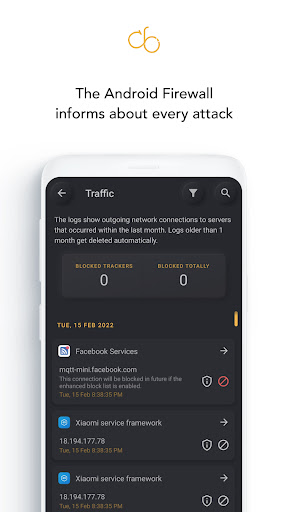
Background communication monitoring
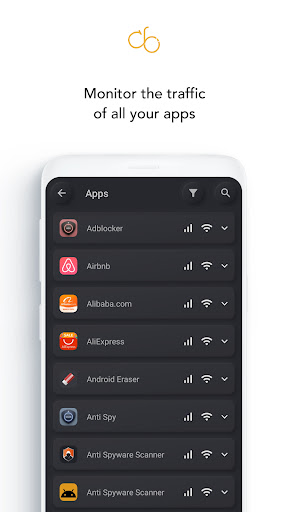
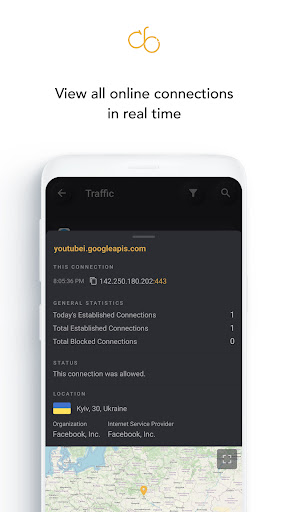
The app shows you the connection attempts made by the apps, helping you detect abnormal behavior such as frequent, unexplained calls.
Reduce ads and tracking
When you block certain advertising or analytics communications, you will often notice a decrease in ads within some apps and an improvement in privacy, depending on how the app works and the block lists available.
Extra protection while browsing
Some firewall applications provide DNS or suspicious domain blocking options, which enhances browsing protection and reduces the chances of opening unsafe links.
The difference between no root firewall and VPN applications
It is important to clarify the difference because many users confuse the two:
The primary purpose of the Firewall No Root app is to filter and block connections within the device, not to change your country or hide your identity like a traditional VPN. You might see a VPN icon because the technology used is the same, but the function is different.
How to use Firewall No Root for the first time
After installing and opening the application, you will see a few simple steps:
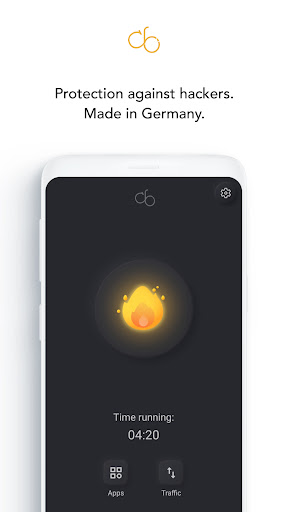
Activate the security, then allow the creation of a local VPN connection, and a list of applications will appear. You can then specify who is allowed to connect and who is blocked.
Then you can apply general rules such as:
Block internet access for non-essential apps, allow essential apps such as calls, messages and mail, then monitor the log to ensure everything is working normally.
Best suggested settings for maximum protection
Settings suitable for the average user
Start by blocking internet access for apps that don't require a constant connection, and monitor the situation for two days. If you notice an app has stopped using an important feature, partially re-enable it, but only on Wi-Fi.
Strong privacy settings
Allow internet access only for essential apps, and limit background apps. Monitor apps that send a lot of connections; you'll often discover troublesome apps within the first week.
Settings to save data and battery
Limit data usage to Wi-Fi only for resource-intensive apps, and disable background updates whenever possible. This step alone can significantly reduce data consumption.
Application limitations and important information before relying on it
It is best for the article to be realistic and clear, because there are points that need to be known:
Android typically only allows one VPN to run at a time, so you might not be able to run Firewall No Root with another VPN simultaneously. Also, some apps, such as messaging apps or email notifications, may stop working if you completely block them; this is normal because these apps need an internet connection to function.
Also, no application offers “absolute protection” against all types of hacking. A firewall reduces risks, gives you control, and limits suspicious connections, but it doesn't replace system updates, using strong passwords, and being wary of untrusted links.
Who is a firewall application without root access suitable for?
Suitable for users who want:
Higher privacy, reduced tracking, internet control for apps, data and battery saving, and reduction of annoying background connections.
It may not be suitable for those who rely permanently on an external VPN all the time, as combining the two may be limited depending on the device and system.
conclusion
If you want a practical solution that gives you complete internet control on Android without root access, then Firewall (No Root) An excellent choice for 2026, as it combines ease of use with real-time network control and reduced tracking and unnecessary connections. With the settings configured correctly, you'll notice a significant difference in privacy, data consumption, and even battery life.
Also download: Turbo VPN hacked و Secure VPN hacked.















No comments yet.